
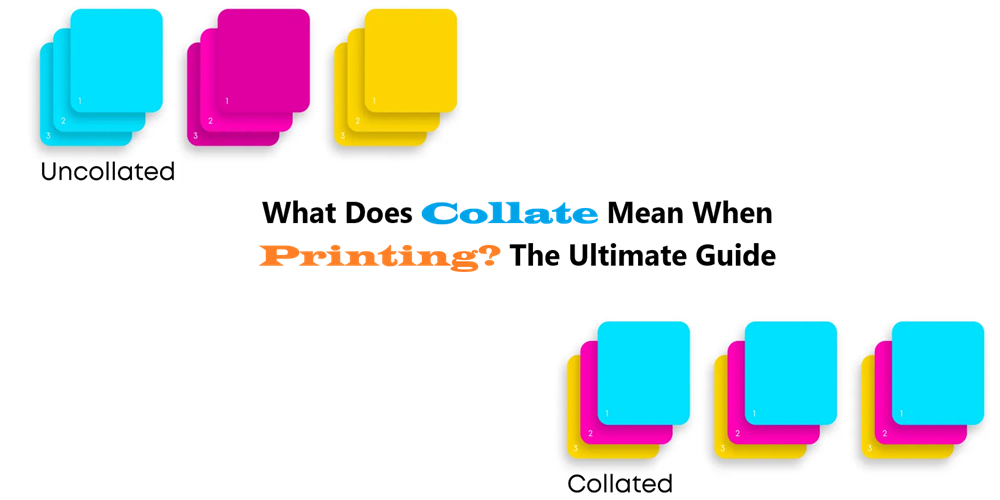
The term “collate” on a printer refers to the specific function that arranges multiple copies of a multi-page document into the correct sequence. Instead of producing multiple copies of the first page, then multiple copies of the second, and so on, collating ensures each complete set of the document is printed together. It’s the difference between receiving a stack of pages that need manual organization versus a stack of ready-to-use documents. This seemingly simple function addresses a fundamental human need for order and efficiency.
Consider the alternative. Without collation, distributing a 20-page report to ten recipients would require you, or someone else, to manually assemble each report page by page. The collate function automates this tedious process. This seemingly simple function reveals a deeper fascination with automated organization. We’re drawn to machines that not only execute tasks but also optimize the outcome, reducing human effort and potential for error.
The mechanics of collation vary slightly depending on the printer’s internal architecture. However, the underlying principle remains consistent. The printer receives the entire document electronically. It then utilizes its internal memory to store the data, and prints each page in sequence for each set of the document. More advanced printers might employ duplexing capabilities to further streamline the process, printing on both sides of the paper before collating.
The Nuances of Collating: Beyond the Basics
While the fundamental definition of “collate” is straightforward, its application can involve several configurable parameters, providing greater control over the final output.
- Reverse Collate: Some printers offer a “reverse collate” option. This outputs the document in reverse order (last page first). This can be advantageous if the printer’s output tray dispenses documents face-up, resulting in a properly ordered stack after printing.
- Grouped vs. Ungrouped: This refers to whether all copies of each page are printed together (ungrouped) or whether each set is complete (grouped, i.e., collated).
- Stapling and Binding Integration: High-end printers and multifunction devices (MFDs) often integrate collation with automatic stapling or binding functionalities. This further automates document production, delivering finished booklets or reports directly from the printer.
Why Collation Matters: Efficiency and Professionalism
The benefits of using the collate function extend beyond mere convenience. Properly collated documents contribute to:
- Enhanced Efficiency: It eliminates the time-consuming task of manual sorting, freeing up personnel for more strategic activities. In high-volume printing environments, the time savings can be substantial.
- Reduced Errors: Manual collation is prone to errors, such as misordering pages or creating incomplete sets. Automatic collation minimizes these risks, ensuring accuracy and consistency.
- Improved Professionalism: Neatly collated documents present a more polished and professional image. This is especially important for external communications, such as reports, proposals, and marketing materials.
- Streamlined Workflow: Integrating collation into the printing process streamlines the overall workflow, from document creation to distribution.
Troubleshooting Collation Issues
While collation is a relatively simple function, problems can occasionally arise. Common issues include:
- Incorrect Settings: Ensure that the collate option is properly enabled in the printer driver or control panel. Verify that other settings, such as paper size and orientation, are also correct.
- Driver Problems: Outdated or corrupt printer drivers can interfere with collation functionality. Updating or reinstalling the driver may resolve the issue.
- Printer Memory Limitations: Printing large, complex documents with collation enabled requires sufficient printer memory. If the printer runs out of memory, it may fail to collate properly. Consider reducing the document’s complexity or adding more memory to the printer.
- Paper Jams: Frequent paper jams can disrupt the collation process. Ensure that the printer is properly loaded with the correct type of paper and that the paper path is clean and free of obstructions.
The Future of Collation: Beyond the Physical Realm
While collation is traditionally associated with physical printing, the underlying principle of organizing data sequentially is applicable to digital documents as well. In the context of electronic document management systems, “collation” can refer to the process of merging multiple digital documents into a single, cohesive file. For instance, combining individual PDF pages into a complete report. This digital collation ensures that the document is presented in the correct order, regardless of how it was created or distributed. This concept extends to data aggregation and organization in various digital platforms, reinforcing the enduring value of structured information.
In conclusion, the collate function on a printer represents more than just a convenient feature. It embodies a fundamental principle of organization and efficiency that permeates various aspects of our lives, both physical and digital. Understanding its nuances and troubleshooting potential issues ensures that we can fully leverage its benefits, contributing to a more streamlined and productive workflow. From the mundane task of printing reports to the complex world of data management, the ability to arrange information in a logical sequence remains paramount.






Leave a Comment