Short Answer
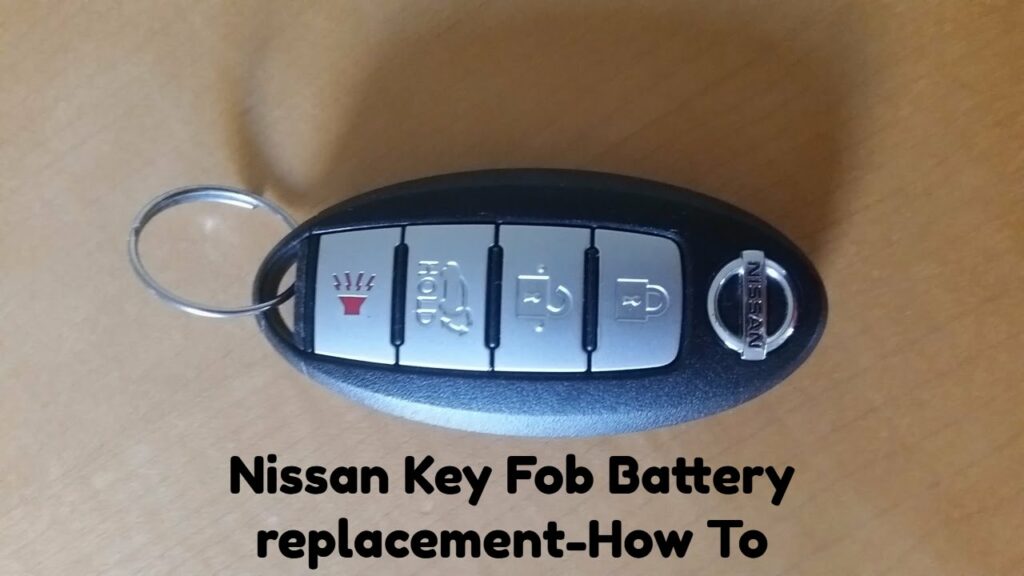
Owning a Nissan vehicle often imbues its enthusiasts with a distinctive sense of pride, encapsulated in the little experiences that enrich daily life – much like the pivotal role of a key fob. These modern marvels of automotive design offer unparalleled convenience, yet they are not immune to the wear and tear of time. A particularly common observation amongst Nissan car owners is the gradual decline of key fob functionality, typically signalling the need for a battery replacement. With this guide, you shall embark on a comprehensive journey detailing how to methodically change your key fob battery, ensuring uninterrupted access to your beloved vehicle.
Before delving into the step-by-step process, it is essential to understand why this task necessitates attention. The key fob is a microcosm of connectivity, bridging the gap between you and your automobile. As the nerve centre of various features, from keyless entry to remote ignition, a malfunctioning key fob can lead to considerable inconvenience. Thus, mastering the art of battery replacement is not merely a technical task; rather, it is an embodiment of your care for the vehicle, propelling you deeper into the intricate relationship between man and machine.
Now, let us proceed with the meticulous steps involved in changing your Nissan key fob battery.
Step 1: Gather Your Tools
Like any skilled artisan, preparation is key. For this task, you will require:
- A replacement battery, typically a CR2032 for most Nissan key fobs (confirm the specific type for your fob).
- A small, flat-head screwdriver or a plastic prying tool to assist with opening the fob.
- A clean workspace, preferably a soft cloth, to prevent scratches and keep small parts from disappearing.
With all tools at your disposal, proceed to the next step with confidence.
Step 2: Open the Key Fob
The glorious moment of accessing the innards of your key fob begins here. Identify the seam where the two halves of the fob meet. Depending on the model, there may be a dedicated slot or a small notch to help with prying open the casing. Insert the flat-head screwdriver or plastic tool gently into this opening, applying light pressure to separate the two halves.
Caution is paramount during this phase; excessive force can lead to irreversible damage. Take a moment to appreciate the intricacy of the design as you gently part the halves, revealing the inner workings of the fob.
Step 3: Remove the Old Battery
Upon successfully opening the fob, locate the battery nestled within. It should be sitting snugly in its compartment. Note the orientation of the battery because the new one should mirror it precisely upon installation. Use the screwdriver to lightly pry the old battery from its seating, taking care to avoid any damage to the surrounding electronic circuits.
As you remove the old battery, reflect on the simplicity of this object that has facilitated so many journeys, now referred to as ‘spent’ but invaluable nonetheless.
Step 4: Insert the New Battery
Now, it is time for a fresh start. Take your new CR2032 battery and ensure it is aligned in the same configuration as the previous one. Push it gently into place, ensuring it fits snugly without forcing it. This step is pivotal, as a misaligned battery could lead to further functionality issues. Once you hear or feel a click, you can be assured that the new battery is seated properly.
Step 5: Reassemble the Key Fob
The reassembly process is reminiscent of a jigsaw puzzle, as you approach the completion of your task. Align the two halves of the fob carefully and press them together. Apply even pressure around the edges to ensure that they snap back into place securely. Check for any gaps that may suggest an incomplete closure. Should all appear well, your key fob is once again whole.
Step 6: Test the Key Fob
Having successfully replaced the battery, the eagerly awaited moment arrives: testing your key fob. Stand near your Nissan vehicle and press the buttons to ensure they respond accordingly. Locking and unlocking doors, and testing any additional features such as the boot release or remote start, provides a wonderful sense of satisfaction.
Step 7: Final Thoughts
It is wise to reflect on the experience post-replacement. The act of replacing a key fob battery may seem rudimentary at first glance, yet it serves as an important gesture of maintenance and care for your Nissan. By tackling this simple yet meaningful chore, you not only restore functionality but also forge a deeper bond with your vehicle. Remember that exploring the intricacies of our possessions is often what truly enriches our experiences.
As vehicles evolve alongside technology, embracing small, proactive measures like battery replacement ensures that you remain at the forefront of this journey. The inconspicuous key fob may be small, but it is emblematic of the larger adventures that await with your trusty Nissan.
FAQ
What type of battery does a Nissan key fob use?
Most Nissan key fobs use a CR2032 battery, but it’s important to confirm the specific type for your model.
How often should I replace my key fob battery?
You should replace your key fob battery when you notice a decline in its functionality, which can vary based on usage.


Leave a Reply